Steam dominates the PC gaming landscape as the most widely used digital distribution platform, housing virtually every significant title released in recent years. Despite this massive library and Steam's detailed tracking systems, the platform surprisingly makes it difficult to view your total gaming hours across all titles.
The challenge becomes clear once you start looking for this information. Steam displays individual game playtime prominently, but calculating your cumulative hours requires external tools and a few extra steps. This design choice means most players remain unaware of their actual time investment across their entire Steam library.
Several specialized tools have emerged to fill this gap, offering detailed breakdowns of your Steam activity. This guide breaks down the exact process for checking both individual game hours and your total Steam playtime. The methods covered here work for any Steam user looking to analyze their gaming habits or simply wanting to know where their time has gone.

Check Your Steam Playtime for Individual Games
Steam makes individual game playtime easily accessible through multiple locations within the platform. This built-in tracking system provides detailed metrics for every title in your library without requiring external tools.
Open the Steam desktop app
Launch the Steam application on your computer and ensure you're logged into your account. The desktop client provides the most comprehensive access to your library statistics and playtime data. Steam automatically tracks your gaming sessions, so this information updates in real-time as you play.
Go to your Library and select a game
Click the "Library" tab in Steam's top navigation menu. Your game collection appears here in either list or grid format, depending on your display preferences. Select any game title to view its detailed information page, which contains all tracked statistics for that specific title.
Find the 'Play Time' under the game title
Steam displays playtime information directly under each game's title. The platform tracks multiple time-related metrics that provide a complete picture of your gaming activity:
Total hours played on record
Playtime over the last two weeks
Current session time when actively playing
Steam offers several alternative locations to view this same data:
On the game's Store page, above your review (shows the last two weeks of playtime)
Through your profile page by clicking on "Games" and selecting "Recently Played"
By sorting all your games by playtime in your profile's game section
Steam's automatic tracking system operates seamlessly in the background without requiring any third-party applications. This feature proves particularly valuable for analyzing which games dominate your gaming schedule and identifying your most-played titles.
The individual playtime feature works perfectly for examining specific game investments, but calculating your total Steam hours across all titles requires a different approach entirely.
See Your Total Steam Hours Using Online Tools
Steam's decision to hide cumulative playtime stems from deliberate design choices rather than technical limitations. The platform prioritizes individual game metrics, likely to avoid confronting users with potentially alarming total hour counts. Most Steam libraries contain a few heavily-played titles with hundreds of hours alongside numerous games with minimal playtime, creating distributions that Steam chooses not to automatically calculate.
Third-party tools have stepped in to fill this gap, accessing Steam's official API to provide the statistics that Steam itself keeps buried.
Set your profile and game details to Public

External playtime calculators require access to your Steam data, which means adjusting your privacy settings first:
Navigate to your Steam privacy settings
Set My Profile to Public
Set Game Details to Public
These privacy adjustments take 5-10 minutes to propagate through Steam's servers, so expect a brief delay before external tools can access your data.
Use SteamCalculator.gg to check total time
SteamCalculator.gg stands out as the most reliable option for analyzing your Steam activity. After making your profile public, visit and enter your Steam URL. The tool pulls data directly from Steam's API to display:
Total playtime across all games
Account value (current and historical)
Game breakdown by hours
Detailed statistics about your gaming patterns
The system updates in real-time as long as your profile remains public, ensuring accurate tracking of your gaming history.
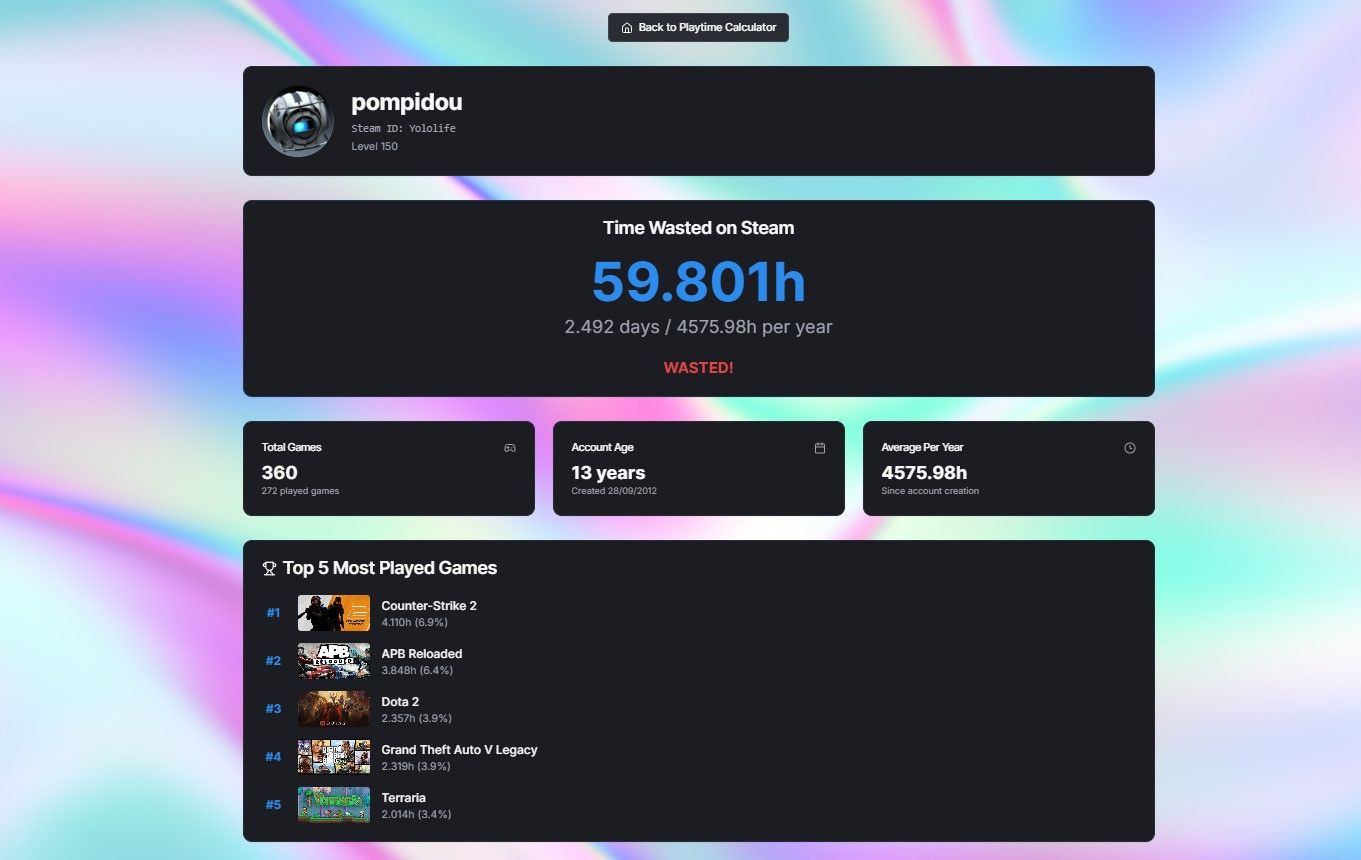
Example: Yololife's profile breakdown
Yololife's profile on SteamCalculator.gg demonstrates the detailed analysis these tools provide. The breakdown shows not just total hours but reveals specific gaming patterns - which titles dominate their playtime, how their gaming habits have evolved, and the monetary value of their most-played games. This data visualization makes it easier to identify where thousands of hours have actually gone rather than relying on rough estimates.
The profile analysis reveals gaming trends that might surprise even dedicated players, showing exactly which games have consumed the most time and whether that investment aligns with their perceived gaming preferences.
Compare Tools to Track Steam Time Played
Three primary platforms dominate the Steam analytics space, each offering distinct approaches to tracking your gaming statistics. These tools have emerged as essential resources since Steam lacks native total hour tracking.
SteamCalculator vs SteamGauge vs SteamTime
SteamCalculator focuses on simplicity and essential metrics, delivering playtime totals alongside library valuations through a clean interface. SteamGauge takes a more analytical approach, offering advanced sorting capabilities, including "price per hour played" calculations that help evaluate your gaming investments. SteamTime distinguishes itself through social features, positioning your statistics against other users in its database.
Each platform serves different user needs. SteamCalculator appeals to players seeking quick overviews, while SteamGauge targets users who want detailed breakdowns of their gaming patterns. SteamTime caters to competitive players interested in ranking comparisons.
What each tool shows beyond just hours
These platforms extend far beyond basic hour tracking:
SteamCalculator: Calculates current library values, though accuracy suffers for titles that transitioned to free-to-play models after purchase
SteamGauge: Presents sortable data tables covering multiple variables, enabling comprehensive habit analysis
SteamTime: Ranks users among nearly 400,000 other profiles, providing context for your gaming activity
Profiles like Yololife's demonstrate how SteamCalculator.gg presents both total hours and value breakdowns, creating detailed gaming portfolios that reveal spending and time patterns across entire libraries.
How accurate are these tools?
These services generally provide reliable data with important caveats. Hours played and achievement tracking update automatically when profiles remain public. However, users occasionally report tracking inconsistencies. One documented case involved a player with nearly 4,800 logged hours who suspected the actual total should be significantly higher.
Pricing accuracy presents the biggest limitation. These tools cannot account for sales purchases, or promotional acquisitions, potentially inflating apparent library values. The data reflects current store prices rather than actual purchase costs.
What Your Steam Hours Say About You
Steam hours represent more than simple time tracking they create a detailed record of your gaming preferences and habits over extended periods. Profiles analyzed through SteamCalculator.gg reveal patterns that span years, showing exactly where players have invested their time.
Analyzing your Steam playtime data
Steam hour totals function like a gaming timeline, documenting which titles captured your attention during different periods. Players regularly accumulate thousands of hours across their libraries, with research showing the average Steam user logs approximately 830 hours total, equivalent to 34 continuous days of gameplay. This data forms what could be called a "geological record" of your gaming history, highlighting the titles that dominated specific periods of your gaming life.
Steam hours as a habit management tool
Playtime statistics offer practical insights for evaluating your gaming patterns. Research reveals only a minimal correlation between game enjoyment and time invested. Players who recommend games typically spend just 7% more time playing them compared to those who don't recommend the same titles. This data helps identify games that genuinely engage you versus those that accumulate hours through idle time or background running.
Comparing your stats with other players
Steam Replay enables direct comparison of your gaming statistics with friends, displaying achievements earned, gaming streaks maintained, and preferred genres. The median Steam user plays only four different games per year, making it notable where your gaming habits fall within this spectrum. Making your Steam Replay public attaches these gaming statistics directly to your profile, creating opportunities for friendly competition or showcasing your gaming accomplishments.
Conclusion
Steam's approach to playtime tracking creates an interesting paradox - individual game hours are prominently displayed, yet total gaming time remains hidden from view. This design choice has spawned an entire ecosystem of third-party tools dedicated to revealing what Steam keeps obscured.
The tools covered here each serve different purposes for different types of gamers. SteamCalculator.gg delivers the most straightforward total hour calculations, while SteamGauge appeals to players who want detailed analytical breakdowns. SteamTime satisfies those curious about how their gaming habits compare to hundreds of thousands of other users.
Beyond the initial shock or pride that comes with discovering your total hours, these statistics offer genuine utility. The data reveals which games have truly captured your attention versus those that simply accumulated idle time. Some players find this information motivates better time management, while others use it to justify their gaming investments or share achievements with friends.
The process itself takes only minutes once you've adjusted your privacy settings. Most Steam users are surprised by both their total hours and the distribution across their library - often discovering they've invested far more time in certain titles than they realized.
Your Steam statistics represent a digital timeline of your gaming evolution. Whether you use this information for self-reflection, friendly competition, or simple curiosity, the tools exist to reveal exactly where your gaming time has been spent.